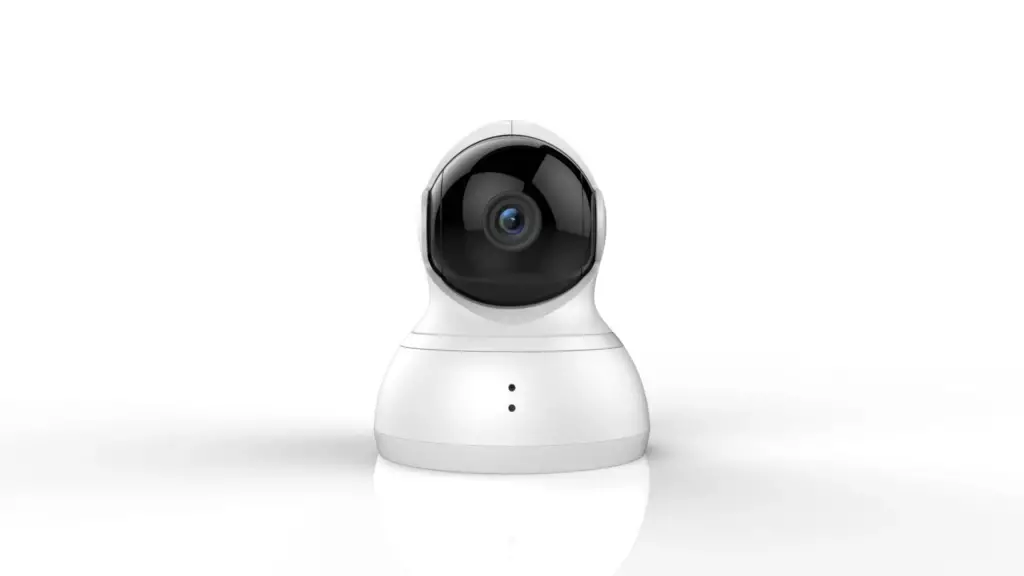
Today, in this article, we’ll be covering YI Dome multi-purpose camera that you can use for baby monitoring, surveillance, security, or any other purpose at your disposal.
This small camera is loaded with many features at a very affordable price. It has a mechanical pan and tilt, motion tracking system, sound detection, local and cloud data recording, and much more.
If you are using this camera for baby monitoring, it has a baby crying alert feature. You can also click panoramic pictures as well.
It has a decent build quality and also looks pretty good. Its stylish finishing makes it look like a piece of decor. It has a sturdy solid base, and smooth edges make it easy to use.
I like the dome camera because it provides a wide range of motion and 360 degrees view that covers the whole surveillance area properly.
You can save the footage in the local SD Card, or there is also the option of cloud storage. The cloud plans have different payment options that you can choose from.
It is very easy to use, and you can smoothly operate it from your Android and iOS device. It also has a night vision feature, but it is not very comprehensive, so don’t expect too much in low light conditions.
It has a good quality microphone, and its advanced technology makes it suitable for long-range communication.
You need to download the dedicated YI Dome App to control the camera. Below is the list of items you would be getting with the camera.
- YI Dome Camera
- USB Wall Plug
- USB Cable
- Mounting Bracket
- Screws
Table of Contents
Pros
- The design and build quality of the camera is pretty good.
- It has a very affordable price. There are very few cameras this much capable enough at this price range.
- It has multiple modes to choose from. You can create panorama shots or night vision mode in low light conditions.
- It is very easy to set up.
- It has local and cloud storage option
- The motion tracking feature is very accurate.
- Two communication gives you more freedom.
Cons
- Though it’s a 1080P Camera, you won’t be very happy with the picture quality.
- It only supports a 32GB Memory Card, and for cloud storage, you need to pay extra.
- It captures video only in 15fps.
Check the Best Price on Amazon
Yi Dome Camera 1080p Review
This section will talk about different important aspects of the YI Dome camera that one should be aware of before buying it.
If you are interested in buying the camera, you must go through all the points to give you better clarity about YI Dome. So, let’s dive into all the aspects one by one.
Build Quality
It has a great build quality and looks sturdy as well. It came in a circular shape and was a bit larger than other cameras in this price range.
It has a manual tilt; it will remain pointed in one direction if you don’t move it. It is not weather resistant, so only suitable for indoor use only.
Motor present in the camera is a bit noisy and makes a sound when you move them. If your baby is sleeping, it might wake him up as well.
The camera rotation is pretty good, allowing you to see everything around it. It can be rotated vertically and horizontally as well.
- Vertical Movement: 115 Degree
- Horizontal Movement: 345 Degree
Ease of Use
There are many cameras in the market, but using them becomes a real pain. YI Dome is easy too, and from a single day, you’ll become used to it.
Make sure; you have already downloaded the app before using it.
The app gives you the QR code to show the camera, and the connection happens automatically.
It only works at 2.4GHz Wifi, and within 15-20 minutes, you’ll be able to use it.
Camera Audio & Video Quality

This is the 1080P camera; you can also go for the 720P version, which will be a bit cheaper than this one.
Though the camera’s video quality is not very crisp, it is decent enough considering the price.
The field of view is only 112 degrees that could have been better. The camera’s exposure is also not very good, but it does the job.
The camera has infrared LEDs, which illuminates 15-20 feet in low light conditions.
The Audio Quality of the camera is pretty solid, the microphone is sensitive enough, and the speaker is loud enough.
You can use the hand’s free mode, and both parties can freely talk without a glitch.
YI Dome App
The Yi Home app is an all-in-one app that works with all the security camera products of the company.
The app is supported on Android and iOS devices, which you can download from the official company website.
The vertical list will come on the main screen where you can navigate in different options.
Live feed will always be there on the top of the screen.
You can choose among different modes by going through the settings option. It has a good motion tracking system. For more information, you can read the article here.
Check the Best Price on Amazon
How to Pair Your YI Dome Camera
Setting up the camera is pretty simple. Follow the below steps one by one.
- At first, you need to download and install the YI Home App.
- Then Go and Create a YI Home Account.
- You need to connect your device through WIFI (Only 2.4GHz connectivity)
- You also need to adjust the router settings to pair your camera.
- Then log in to your account and click on the + button to select your camera.
- Turn on the camera, and then there will be a voice prompt for connecting to the WIFI network.
- Choose 2.4GHz wifi, enter the password, and make the connection.
- Scan the QR Code that comes to your smartphone to the camera, and everything is set up, now you can use the camera.
Technical Specifications
| YI Dome Camera | Specifications |
|---|---|
| Camera | 1080P @15fps |
| WIFI Connection | 2.4GHz |
| App Support | Android & iOS |
| Baby Cry Detection | Yes |
| Presets | 8 Bookmarks |
| Motion Tracking | Yes |
| Storage | Local & Cloud |
| 2 - Way Communication | Yes |
| Price | Check Here |
Conclusion
This is undoubtedly one of the most popular security cameras on Amazon, with many positive reviews. It has some cool features which make it stand out from the crowd.
It has a stylish finish, making it look like a decor piece. Though there are some glitches as well when it comes to video quality and range transmission still the camera is worth giving a try.
You can mount the camera on the ceiling or wall at your disposal. There are different presets and modes to choose from. Depending on the requirement, you can buy a single camera or buy it in pairs.
We have covered everything that you need to know about the camera. For more information, you can let us know in the comments below, and we’ll try to respond as soon as possible.
Check the Best Price on Amazon
YI Dome Related Questions (Must Read)
What is the different way to install YI Dome Camera 1080p?
You can install it horizontally at the table or on the wall or ceiling with a mounting bracket. It entirely depends on you.
What accessories come with YI Dome Camera 1080p?
You don’t need to buy anything separately. You’ll be getting everything you need for setup with the package only.
How is YI Dome Camera 1080p’s weather resistance?
It’s not for outdoor use. It can operate from 0degree to 50degree Celcius. Recommended only for indoor use.
Can I use a portable battery to supply power?
Yes, you can use a portable battery.
Which is the best Security camera under $100?
You can try this Waterproof Logitech Camera that works with Alexa & Google.