Today we’ll discuss one of the best underwater 4k cameras that will take your filming experience to the next level. It gives very good competition to the GoPro cameras, and at the same time, it comes at such an affordable rate.
You receive it in a very good package when you get the delivery. You will get all the essential accessories with the product.
You’ll be getting additional batteries with charger, adapter, and mounts. The same doesn’t go when you buy a GoPro, and there you have to buy everything separately.
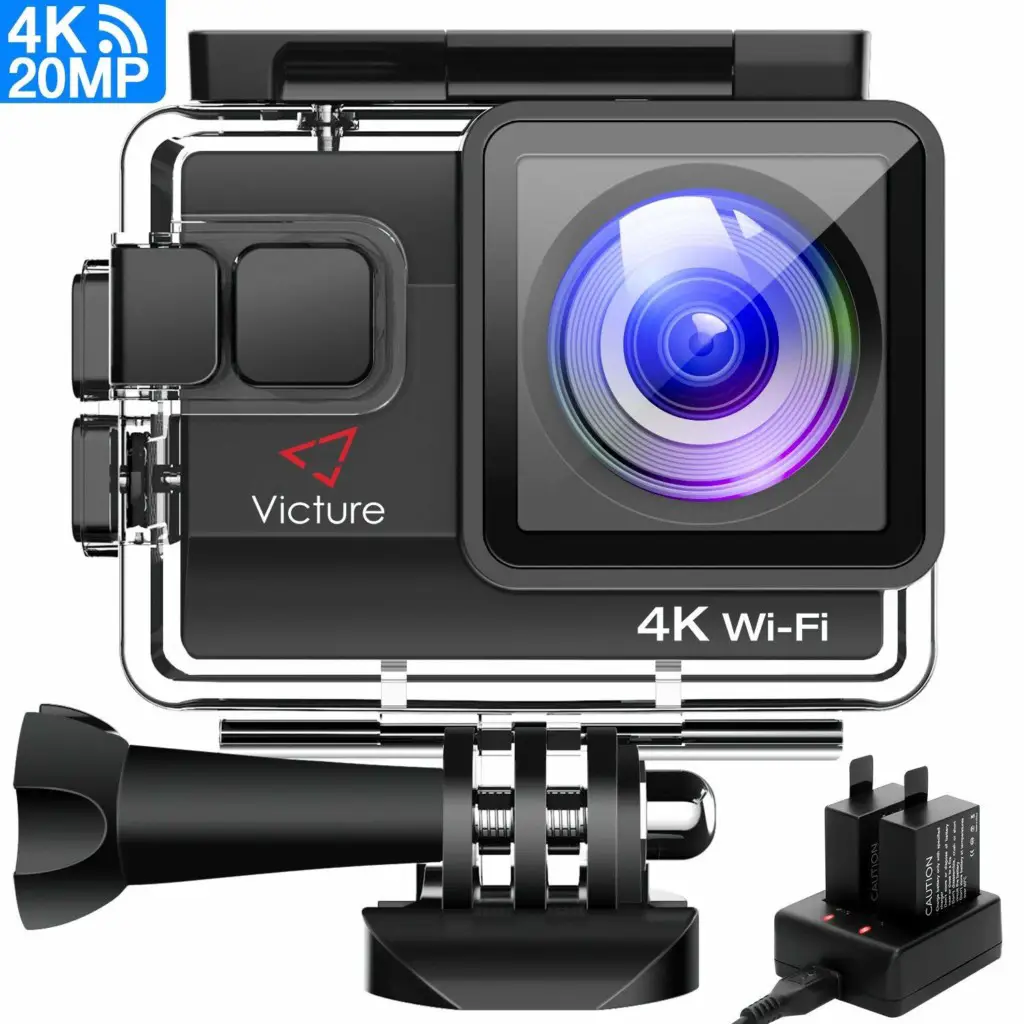
The camera setup is pretty simple. Within five minutes, you’ll be able to use the camera. It’s very lightweight and makes it very portable, and you can easily carry it from one place to another.
You can connect your camera with your mobile by WIFI. For a WIFI connection, you need to download the app first and provide a picture and video access.
Don’t expect the quality exactly like GoPro, but you will get the very decent quality, making this camera worth its price. Below is the list of items you would be getting with the product.
1x Victure 4K Camera
1x IP68 Housing (Waterproofing)
1x Dual USB Charger
1x USB Cable
2x Battery
2x Frame Mounts
2x Quick Release Mounts
1x Surface J-Hook Buckle
2x 3M Adhesive
1x Back-up Battery Cover
1x Helmet Mount
1x Handle Bar
2x Bandages
3x 3-Way Pivot Arm
Table of Contents
Victure AC800 Review
This section will talk about the different aspects of the picture 4k camera. We’ll cover build quality, camera specs, and much more.
So, read the complete section, and in case of any question, you can let us know in the comments below. We’ll try to respond as soon as possible.
Build Quality
It has solid build quality. Though the price is pretty low compared to others, when you hold it, it gives you the feel of some high-end sports camera.
Its solid waterproof case allows you to go deep into water 40 meters, giving you a decent enough depth option to shoot.
It comes in black color, you have got a power button on the front, and the body, Victure, and 4k WIFI are written.
Affordability
Its low price is the forte of this adventure camera. When we think of underwater sports cameras, we always think of cameras that cost you hundreds of dollars.
But this one comes around $50 and gives good competition to those expensive cameras.
Victure company has opened the doors for beginners and other sports enthusiasts looking for a decent camera at an affordable range.
Ease of Use
Within seconds, you can set up the camera, and it is ready to use. You can use the other software to edit the video. You can also use the GoPro Software without a glitch.
Here, with the kit, you get all the accessories required. You don’t have to buy anything separately.
This makes things easier for you and gives you the freedom to use it at your disposal.
HD Quality Video
Here, you get a 20MP Camera which gives you buttery smooth HD quality footage. It has a lot of advanced features as well. You also have 4X Zoom, and the video is free from shaking.
170-degree wide-angle view with 2 inch LCD Screen gives you the live view option so that you can set the frame and composition properly.
You can record the 4k video in cinematic 24fps. I appreciate that the camera can also automatically adjust the white balance when you dive into the water.
Water Proof
This camera also gets a sealed pack once you put the waterproof housing, which allows you to go to the depth of 40m. Make sure you put the housing properly before you start using it.
For more instruction, you can read the manual as well. Don’t go too deep into the water (beyond 40m). Because once the water goes inside the body, your camera is gone.
Advanced Features
You can take some cool wide-angle shots with a camera. Let me tell you one thing, the handling of a sports camera is a bit different than the normal camera, and you need to do some practice to get a hold of it.
You can also do timelapse with the picture. It has motion detection, night scene, gyroscope, FPV mode, car mode, ISO Sensitivity, and much more.
You also get 12 months of warranty with the product, which itself boasts about its durability.
Shooting Modes
- Time-lapse recording
- Continuous shooting
- Loop recording
- Self-timer
- Motion detection
- TV mode
- Night scene
- Diving mode
Technical Specifications
| Victure | Specifications |
|---|---|
| Screen Size | 2 inch |
| Lens Angle | 170 Degree |
| Video Resolution | 4k/24fps |
| Photo Resolution | 20MP |
| Recording Time | 180mins |
| Water Proof | Up to 40m |
| Battery | 1050mAh |
| Warranty | 1 year |
| Total Accessories | 22 with the kit |
| Price | Check Here |
Camera Video Samples | Watch the Video till End
Verdict
The camera has received a very good rating online and received the Amazon’s Choice Award. It has a good build quality, and you also get a lot of advanced features. For more information, you can visit their official site.
This camera is available for shipping all around the world.
If you are looking for some other alternatives, you can check the below-given options. In case of any doubt, you can let us know in the comments below. We’ll try to respond as soon as possible.
FAQs (Frequently Asked Questions)
Which SD Card does the camera support?
The camera supports the 10 Micro SD Card up to 64 GB.
How’s this camera in low light condition?
It’s not suitable for low light conditions. You’ll only see dark.
How to control the camera with mobile?
You need to download the OKCAM application to control the different camera settings and modes. You can download the Android & iOS Version App here.
How do you get the photos and videos off the camera?
You can use the card reader, or you can also export through WIF via the OKCAM application.
What are other under $50 sports adventure cameras?
Here are some of the best sports adventure cameras under $50.