If your laptop is crashing and you need an immediate backup or love playing games, but due to heavy files, the system does not function appropriately, these hard drives would make the situation a lot easier for you.
You do not have to worry about losing all your files, as that would no more be the case if you had these drives with you. Western Digital Corporation has its headquarters in California in the United States.
The company has been engrossed in providing its customers with one of the best storage devices available in the market, perhaps.
It has also carved its name into providing storage on the cloud. The devices and the services are reliable and offer you smart solutions to your everyday problems so that you have your data organized for you.
You can extract it whenever you need it. The drive would be your best companion for your professional requirements and work.
They are small and come with a USB cable for file transfer. They save a lot of time, and you can get the backup while you are invested in doing something else.
Let us now dive deeper into the specifications of each model to get a better idea of these devices.
WD Easystore is slightly lighter in weight. It weighs 0.50 lbs. On the other hand, WD Elements weigh 0.52 lbs.
While WD Elements is cheaper, it is available for under 100 dollars, whereas WD Easystore costs almost double for a 4 TB hard drive. This is the main difference.
Table of Contents
WD Easystore vs. Elements
|
|
WD Easystore |
WD Elements |
|
Storage Capacity |
4 TB (other capacities available) |
4 TB (other capacities available) |
|
Interface (Hardware) |
USB 3.0 |
USB 3.0 |
|
Affordability |
Under 200 dollars (for 4 TB) |
Under 100 dollars (for 4 TB) |
|
Product Weight |
0.5 lbs |
0.52 lbs |
|
Item Measurements |
5.87 x 4.8 x 1.57 inches |
4.4 x 3.2 x 0.83 inches |
|
Color Available |
Black |
Black |
|
Portable |
Yes |
Yes |
|
Brand |
Western Digital |
Western Digital |
|
Data transfer |
fast |
fast |
|
Compatible |
USB 2.0 and 3.0 |
USB 2.0 and 3.0 |
Apart from these specifications, certain features would help you understand the devices on a much better scale. Let us have a look.
WD Easystore Review
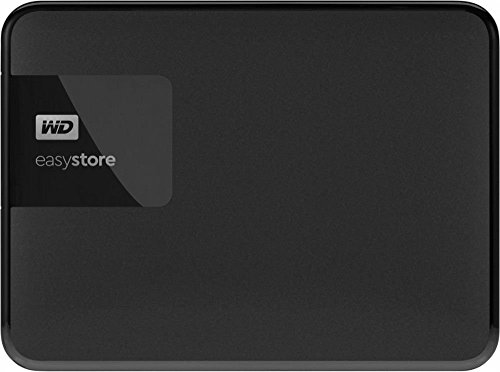
Storage
With this advancement in technology, there comes so much baggage of data in every device you own. Be it a desktop or a laptop, and immense data is present in documents, videos, images, and much more.
Whenever the devices hang or go out of order, there has to be a backup of each device which becomes difficult with the ever-growing data.
You might reserve someplace on the Cloud, but it is always beneficial to have a hard drive that gives you enough space to keep your data in an organized fashion. The device provides you with a storage capacity of 4 TB and many more.
That way, you would not be out of space to store everything you might require in the future for your professional or personal use.
Transfer and Back up data
It gives you an option to backup the data ever created automatically. You can choose that option and go for it. You do not need to do anything separately.
The backup world is slowly in the background. A software known as WD backup software does this work for you. Do not worry. It would not hamper the speed of your PC as it would not take up many resources.
Also, there is an added advantage to it that you do not need to set the backup every time. Instead, you can set a scheduled backup, and the device will preserve your data accordingly.
Further, when you wish to transfer your files into the system or from the system, it provides a speed of 5 Gbps that keeps updating your folders at a good pace, making the system highly functional and progressive.
Easy to use
The device is handy as well as portable due to its lightweight. The interface it uses is USB 3.0 and is therefore compatible with connecting with other devices.
You can easily connect the hard drive to your desktop or laptop and get all set for the transfer. It does not display a compatibility issue even with USB 2.0.
You can easily manage the files and configure them so your files are organized.
You would not face any trouble even when it comes to a point where you need to format it and utilize it to store other files. The hard drive will become as good as new to you, and you can start with the procedure all over again.
Check the Best Price on Amazon
WD Elements Review

Warranty and Returns
The hard drive is affordable as well as compatible. It can be purchased for under 100 dollars which is certainly an added advantage if it would not meddle with your budget.
The drive is compatible with Windows 10, Windows 8.1, Windows 7. However, in that case, it needs formatting with the New Technology file system.
On the other hand, when you need to use the hard drive with Mac, reformatting is needed. The drive offered a USB 2.0 port as well.
It can perform well on both the operating systems PC or Mac. You need not buy a separate hard drive if you have recently purchased a Mac. This makes it even more resourceful and a one-stop solution.
Quick and Easy
The hard drive makes your life a lot simpler. Your files that have been on your laptop or desktop forever need not be deleted.
The cost of the hard drive is budget-friendly and is a good investment for budget-conscious users as it is dependable, and it would last for a good amount of time without you having to spend another penny from your pocket.
The drive will help you transfer the files at a much greater speed than expected so that you can share big files across in almost no time.
The drive even assures that it would enhance the performance of your desktop or laptop better than earlier.
Warranty period
The good thing about the hard drive is that it does not cost much. And in addition to that, it brings a warranty period to back up your investment, which adds to its value.
You do not have to worry about spending a penny from your pocket on any fixation needed during this time. The manufacturer will take care of that.
All you need to do is make sure that you have all the bills intact that mention the purchase date as the warranty period is valid from that date until the period mentioned.
The drive offers a warranty period which is as long as 2 years.
Check the Best Price on Amazon
Conclusion
We all love to keep things for record or future usage. If they are documents, we tend to keep some copies of them, or if we go out with our peers or family, we keep clicking pictures and making videos to make memories forever.
This leads to immense data creation, and that needs to be stored somewhere unless you have the habit of keeping it filtered from time to time.
These hard drives come in handy and prove to be a lot beneficial than you think they might be.
You can always have a backup to your files and keep them with you for a future reference that might be required.
If you judge according to the money aspect of the hard drives, then, of course, you should go for the WD Elements model as it can be bought at half the price of the WD Easystore model.
However, if affordability is not that big of an issue, you can look at the features specific to each device and decide for yourself which model suits your needs better.
WD Easystore comes with a good speed of 5 Gbps for file transfer. It is available with a storage capacity of 4 TB and much more. WD Elements is compatible with Windows and Mac, once reformatting is done, and comes with a warranty of 2 years.
The drives are lightweight, and you can carry them everywhere, in your office or on your trip. If you need a backup, your companion is there to help you out.
The storage space and reliability are unambiguous, and you can trust your choice.
FAQs (Must Read)
Q. Is WD Easystore good for PS4?
A. Yes, it works well for PS4.
Q. I am not extremely well versed with technology. Is there any installation needed for the device?
A. No, there is no installation needed. You can connect it to your laptop or desktop, and it is all set to go.
Q. Is a USB cable included with the hard drive?
A. Yes, it comes with a USB cable; however, it is a small one.
Q. Does it need a battery to charge?
A. No, as soon as you connect it with the USB port, it gets the power required.
Q. Can the hard drive be left plugged in?
A. Yes, it can be left. There would be no issues as such.
Q. Can I set a password for the hard drive?
A. Yes, you can do it by downloading WD Security, which would help you keep your hard drive password protected for Windows or Mac.
Q. The hard drive ejects itself several times. What needs to be done?
A. You can try using another USB port or another USB cable, which would work fine.
Q. Can the hard drive be used to read as well as write the files?
A. Yes, it works well for both.